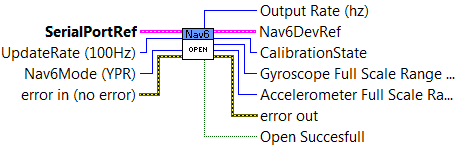
Open a reference to the Nav6 IMU. A reference to a serial port is required to be passed in.
Only YPR Mode is supported at this time. The Open VI should be placed in Begin in the FRC Framework.
|
|
UpdateRate (100Hz) The update rate with which to configure the Nav6 in hz. Valid values are 4 - 100. 100 hz is the default. Values outside the valid range are coerced to the closest valid value. |
|
|
error in (no error) error in (no error) describes error conditions that occur before this node runs. The default is no error. If an error occurred before this node runs, the node passes the error in (no error) value to error out. This node runs normally only if no error occurred before this node runs. If an error occurs while this node runs, it runs normally and sets its own error status in error out. Use the Simple Error Handler or General Error Handler VIs to display the description of the error code. Use exception control to treat what is normally an error as no error or to treat a warning as an error. Use error in (no error) and error out to check errors and to specify execution order by wiring error out from one node to error in (no error) of the next node. |
|
|
status status is TRUE (X) if an error occurred before this node ran or FALSE (checkmark) to indicate a warning or that no error occurred before this node ran. The default is FALSE. |
|
|
code code is the error or warning code. The default is 0. If status is TRUE, code is an error code. If status is FALSE, code is 0 or a warning code. |
|
|
source source specifies the origin of the error or warning and is, in most cases, the name of the node that produced the error or warning. The default is an empty string. |
|
|
SerialPortRef SerialPortRef specifies a reference to the serial port corresponding to the serial device you want to use. Use the Open VI to open this reference. |
|
|
DevStatus DevStatus describes the error status before this VI or function runs. The default is no error. |
|
|
status status is TRUE (X) if an error occurred before this node ran or FALSE (checkmark) to indicate a warning or that no error occurred before this node ran. The default is FALSE. |
|
|
code code is the error or warning code. The default is 0. If status is TRUE, code is an error code. If status is FALSE, code is 0 or a warning code. |
|
|
source source specifies the origin of the error or warning and is, in most cases, the name of the node that produced the error or warning. The default is an empty string. |
|
|
Serial Port Name Serial Port Name specifies the name of the serial port you want to use. |
|
|
Nav6Mode (YPR) The protocol mode to set the nav6 to. YPR - Yaw, Pitch, Roll, Compass Heading Gyro - The Gyro Data update message communicates the raw gyro, accelerometer, magnetometer and temperature data. This data bypasses the Digital Motion Processor, and allows the individual sensors to be used directly without any intervening processing. Quaternion - The Quaternion Data update message communicates the Quaternions calculated by the Digital Motion Procssor, as well as some of the raw sensors readings YPR mode is the only mode currently implemented |
|
|
error out error out contains error information. If error in indicates that an error occurred before this VI or function ran, error out contains the same error information. Otherwise, it describes the error status that this VI or function produces. Right-click the error out front panel indicator and select Explain Error from the shortcut menu for more information about the error. |
|
|
status status is TRUE (X) if an error occurred before this node ran or FALSE (checkmark) to indicate a warning or that no error occurred before this node ran. |
|
|
code code is the error or warning code. If status is TRUE, code is an error code. If status is FALSE, code is 0 or a warning code. |
|
|
source source specifies the origin of the error or warning and is, in most cases, the name of the node that produced the error or warning. |
|
|
Gyroscope Full Scale Range (deg/sec) |
|
|
Accelerometer Full Scale Range (g) |
|
|
Output Rate (hz) |
|
|
CalibrationState Wait - Waiting to start calibrating. Accumulate - Calibrating Complete - Calibration is complete |
|
|
Nav6DevRef Reference to the Nav6 |
|
|
SerialPortRef SerialPortRef returns a reference to the serial port. |
|
|
DevStatus DevStatus describes the error status that this VI or function produces. |
|
|
status status is TRUE (X) if an error occurred before this node ran or FALSE (checkmark) to indicate a warning or that no error occurred before this node ran. |
|
|
code code is the error or warning code. If status is TRUE, code is an error code. If status is FALSE, code is 0 or a warning code. |
|
|
source source specifies the origin of the error or warning and is, in most cases, the name of the node that produced the error or warning. |
|
|
Serial Port Name Serial Port Name returns the name of the serial port you want to use. |
|
|
UpdateRate |
|
|
Error error out contains error information. If error in indicates that an error occurred before this VI or function ran, error out contains the same error information. Otherwise, it describes the error status that this VI or function produces. Right-click the error out front panel indicator and select Explain Error from the shortcut menu for more information about the error. |
|
|
status status is TRUE (X) if an error occurred before this node ran or FALSE (checkmark) to indicate a warning or that no error occurred before this node ran. |
|
|
code code is the error or warning code. If status is TRUE, code is an error code. If status is FALSE, code is 0 or a warning code. |
|
|
source source specifies the origin of the error or warning and is, in most cases, the name of the node that produced the error or warning. |
|
|
Nav6Mode |
|
|
Open Succesfull True if a response to the stream command was received. |


